JavaScript Manipulating Documents
Document Object Model
For security reasons, JavaScript is not allowed to control or manipulate the web browser however it wishes. We have Web API standards that all major browsers follow and by using them we can manipulate a web page in a safe and controlled manner.
The functionality of a web browser that we are allowed to manipulate is typically divided into three main parts:
- Navigator: Represents the state and identity of the browser, and can be accessed through the Navigator object.
- Window: Represents the browser tab that a web page is loaded into, and can be accessed through the Window object.
- Document: Represent the actual page that is loaded into the window, and can be accessed through the Document object.
JavaScript model of a loaded web page
When an HTML document is loaded into the document of a web browser window, the browser creates a tree structure from the HTML structure. We can then use JavaScript to get, edit, insert, remove and modify elements in this tree.
<!DOCTYPE html><html><head><meta charset="utf-8"><title>DOM example</title></head><body><section><ul><li>Item 1</li><li>Item 2</li></ul><p>This is a paragraph</p></section></body></html>
produces a DOM tree similar to the visualized figure below.
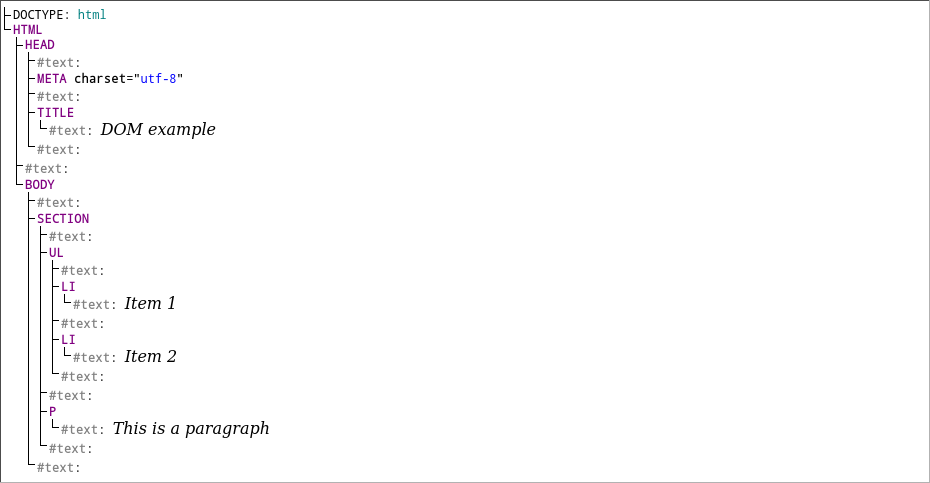
We can see that each HTML element and its text is converted to its own node in the tree. These nodes each have their own child nodes, sibling nodes, root nodes, descendent nodes, parent nodes and text nodes.