Presenting data
The DHIS2 Table component
DHIS2 has several types of tables. The one we will be using in our application is the Table component because
we don't need the added functionality from the DataTable component.
You can find the Table component documentation in Storybook
under the "Data Display" section.
Adding the Table component
Modify your Browse.js component to return a table similar to this. Don't worry about the
order of the rows.
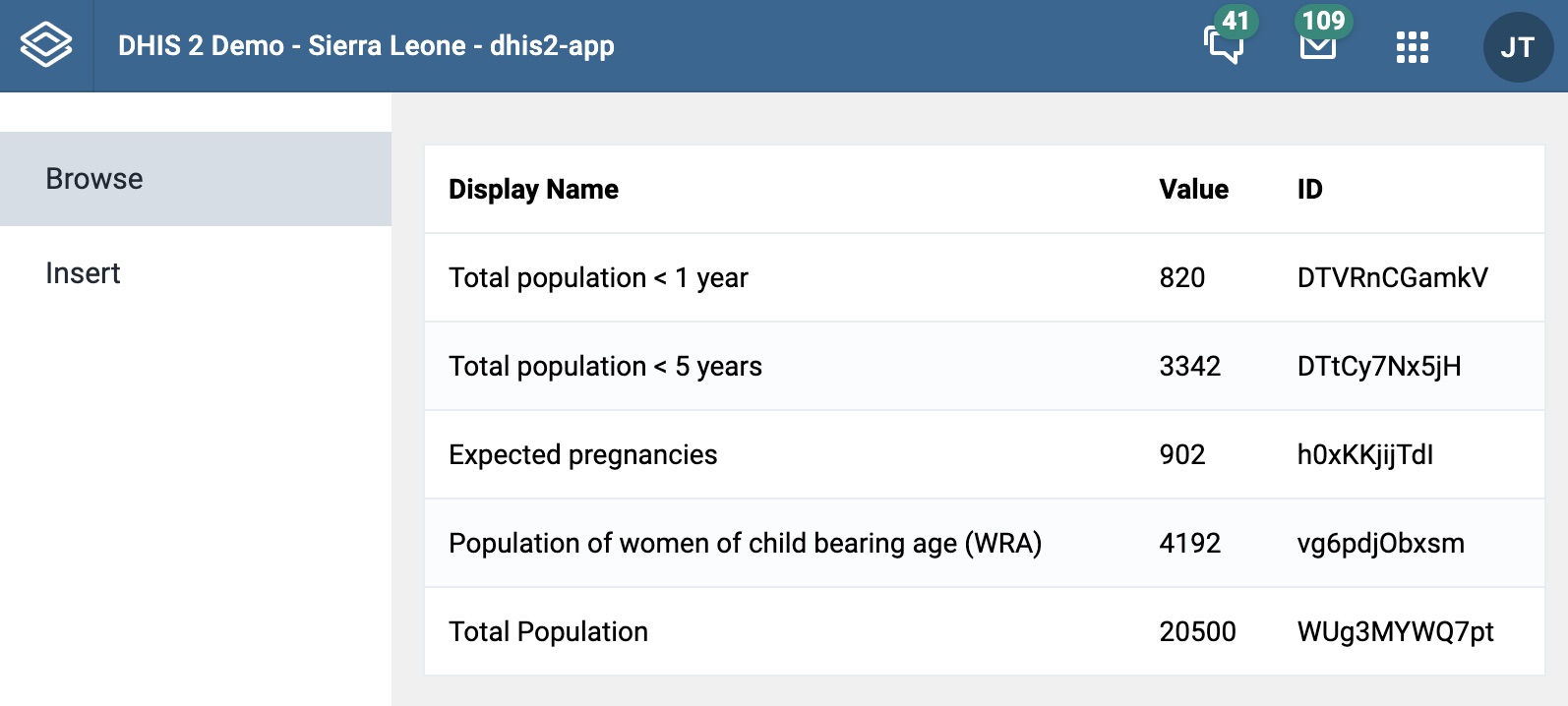
You should first import all the necessary Table components. You can find them at the top of the Docs tab
in Storybook.
Then you should click on the "Show code" button under the table example.
This will show you how the example is implemented and you can easily create the Table, TableHead, TableRowHead,
TableCellHead and TableBody components.
Then you should map through the mergedData dictionary and create a new TableRow containing three TableCell components each.
Solution
We recommend that you try to implement the table before looking at the solution we have provided.
import React from 'react'import { useDataQuery } from '@dhis2/app-runtime'import { CircularLoader } from '@dhis2/ui'import {Table,TableBody,TableCell,TableCellHead,TableFoot,TableHead,TableRow,TableRowHead,} from '@dhis2/ui'const dataQuery = {dataSets: {resource: 'dataSets/aLpVgfXiz0f',params: {fields: ['name','id','dataSetElements[dataElement[id, displayName]',],},},dataValueSets: {resource: 'dataValueSets',params: {orgUnit: 'KiheEgvUZ0i',dataSet: 'aLpVgfXiz0f',period: '2020',},},}function mergeData(data) {let mergedData = data.dataSets.dataSetElements.map(d => {let matchedValue = data.dataValueSets.dataValues.find(dataValues => {if (dataValues.dataElement == d.dataElement.id) {return true}})return {displayName: d.dataElement.displayName,id: d.dataElement.id,value: matchedValue.value,}})return mergedData}export function Browse() {const { loading, error, data } = useDataQuery(dataQuery)if (error) {return <span>ERROR: {error.message}</span>}if (loading) {return <CircularLoader large />}if (data) {let mergedData = mergeData(data)console.log(mergedData)return (<Table><TableHead><TableRowHead><TableCellHead>Display Name</TableCellHead><TableCellHead>Value</TableCellHead><TableCellHead>ID</TableCellHead></TableRowHead></TableHead><TableBody>{mergedData.map(row => {return (<TableRow key={row.id}><TableCell>{row.displayName}</TableCell><TableCell>{row.value}</TableCell><TableCell>{row.id}</TableCell></TableRow>)})}</TableBody></Table>)}}
If you are wondering about the key parameter in the TableRow component
this article
explains the reasoning behind it.
Now that we are done with our Browse.js component, let's go to the next section where we will start working on the Insert component.