Fetching data
DHIS2 Aggregate reporting
In DHIS2 API supports different ways for collecting data. In this course we'll only cover the aggregate approach which is suitable for collecting routine data sets such as monthly reports from health clinics or countries.
Aggregate reporting example
DHIS2 aggregate reporting is best understood as an alternative to paper forms. Imagine this example:
- The country Sierra Leone administers injectable antibiotics.
- When a vaccine dose is administered a nurse logs it on a paper form.
- Once a month a data entry clerk reads these paper forms and counts how many antibiotic injections were administered the last month.
- A report is created that contains the sum of vaccines administered last month. For example:
TB_injectable antibiotics_administered: 42
This new report doesn't contain any information about who received the antibiotics, when they was administered or who administered them. All it contains a number about how many antibiotics were administered this month in Sierra Leone. This is known as aggregate reporting, because it only contains the sum of injectable antibiotic administrations and not the specific details around each of the vaccinations. Now we'll look at how the DHIS2 model is structured to store such data.
DHIS2 Data Model
DHIS2 is a generic & flexible system which allows capturing of any health associated data. The Data Model of DHIS2 shows how their system is designed to achieve such flexible and generic design. It's important to understand this data model as all saving and retrieval of data from DHIS2 is based around this model.
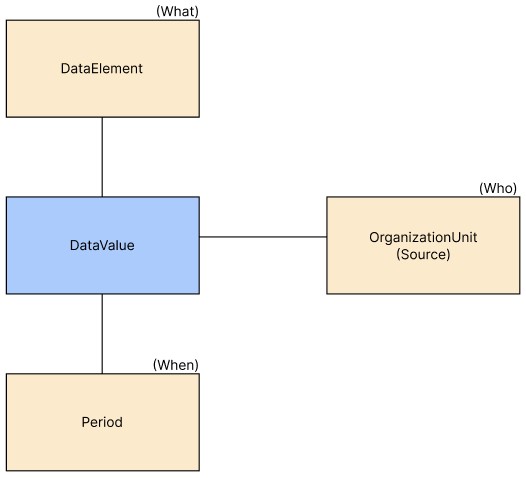
As illustrated, the data model consists of four elements which together makes up how data is stored in DHIS2:
- DataValue: Represents the value stored e.g a number, string or boolean.
- DataElement: Represents what data was stored e.g vaccines or a medicine.
- OrganizationUnit: Represents who stored the value e.g a local hospital or health clinic.
- Period: Represents when the value was stored e.g a month or a day.
Let's revisit the previous example of injectable antibiotics administered in Sierra Leone and see how the data model is mapped to this example.
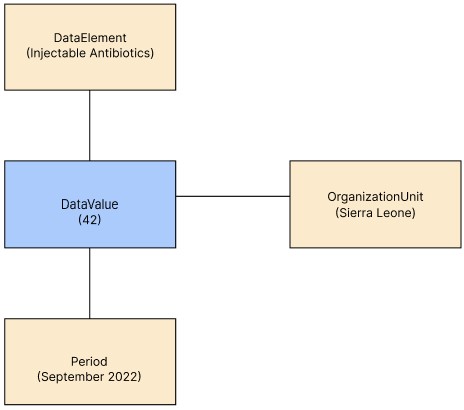
- DataValue: 42 administered units
- DataElement: The administered units are Injectable Antibiotics
- OrganizationUnit: The units are administered in Sierra Leone
- Period: The units were administered September 2022
Data Model relationships
As shown in the figures, a DataValue is connected:
- DataElement (What data is stored)
- OrganizationUnit (Who stored it)
- Period (When the data was stored)
The DataValue has a one-to-many relationship to all these elements. This means that a DataElement, OrganizationUnit or Period may be associated multiple other DataValues. The data model including relationships is illustrated as following:
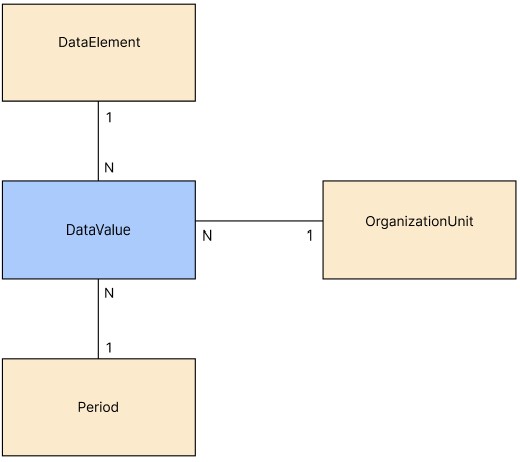
Such relationships are beneficial as it's possible to store multiple DataValues to the same DataElement, OrganizationUnit or period. To illustrate this, let's elaborate on the previous injectable antibiotics example:
- In addition to Injectable antibiotics, The health center also administrated Oxytocin in the previous month which they would like to add to the report.
We can map this to the data model:
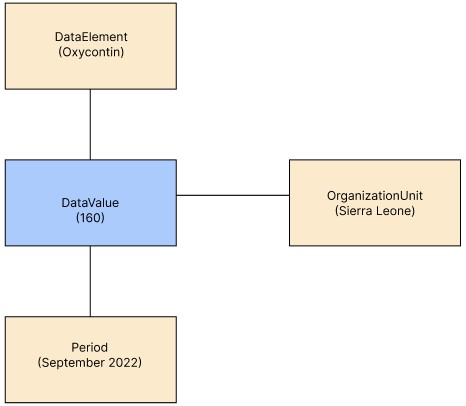
Notice that this mapping uses the same OrganizationUnit and Period as which we used for the antibiotics mapping. We're reusing the same period and organizationUnit which is possible due to the one-to-many relationship.
Elaboration of the element's names
You may have noticed that the name of each element in the data model (DataElement, DataValue, OrganizationUnit & Period) are generic and unspecific. The names don't tell much us much about what the element represents. This is intentionally as these elements should support a large variety of data. In previous examples, we've used antibiotics or oxycontin as examples of a DataElement, however a DataElement is not restricted to either of these and can represent any other type of data. Similarly, Period can represent any time period and OrganizationUnit can represent whatever organization. It's up to administrators of a DHIS2 instance to define the different DataElements, Periods and OrganizationUnit, making DHIS2 usable for a large variety of use-cases. In this course we will only use predefined DataElements, Periods and OrganizationUnits, you will not have to create new ones.
If you want to dive deeper into the DHIS2 data model read "Understanding the DHIS2 data model".
The DHIS2 Academy has covered the data model and several of the API endpoints. I strongly recommend watching it if you are interested in learning more about the DHIS2 API.